
Why WordPress is the smartest CMS choice for most B2B websites

If you’re choosing a CMS for a B2B website, you’ve probably noticed something annoying: everyone has an opinion. Dev teams. IT. Your agency friend. That one guy in your org who built a Squarespace site for his cousin’s band in 2014 and now considers himself “technical.”
And the conversation usually starts with features. But the truth is that your CMS decision is more strategic than technical. Your CMS decision determines whether your marketing team can move at the pace you need it to. If not, every landing page, SEO update, and campaign pivot turns into a ticket in someone else’s backlog.
So, let’s talk about the world of CMSs and why WordPress is still what I recommend for most B2B websites.
Quick refresh: what is a CMS?
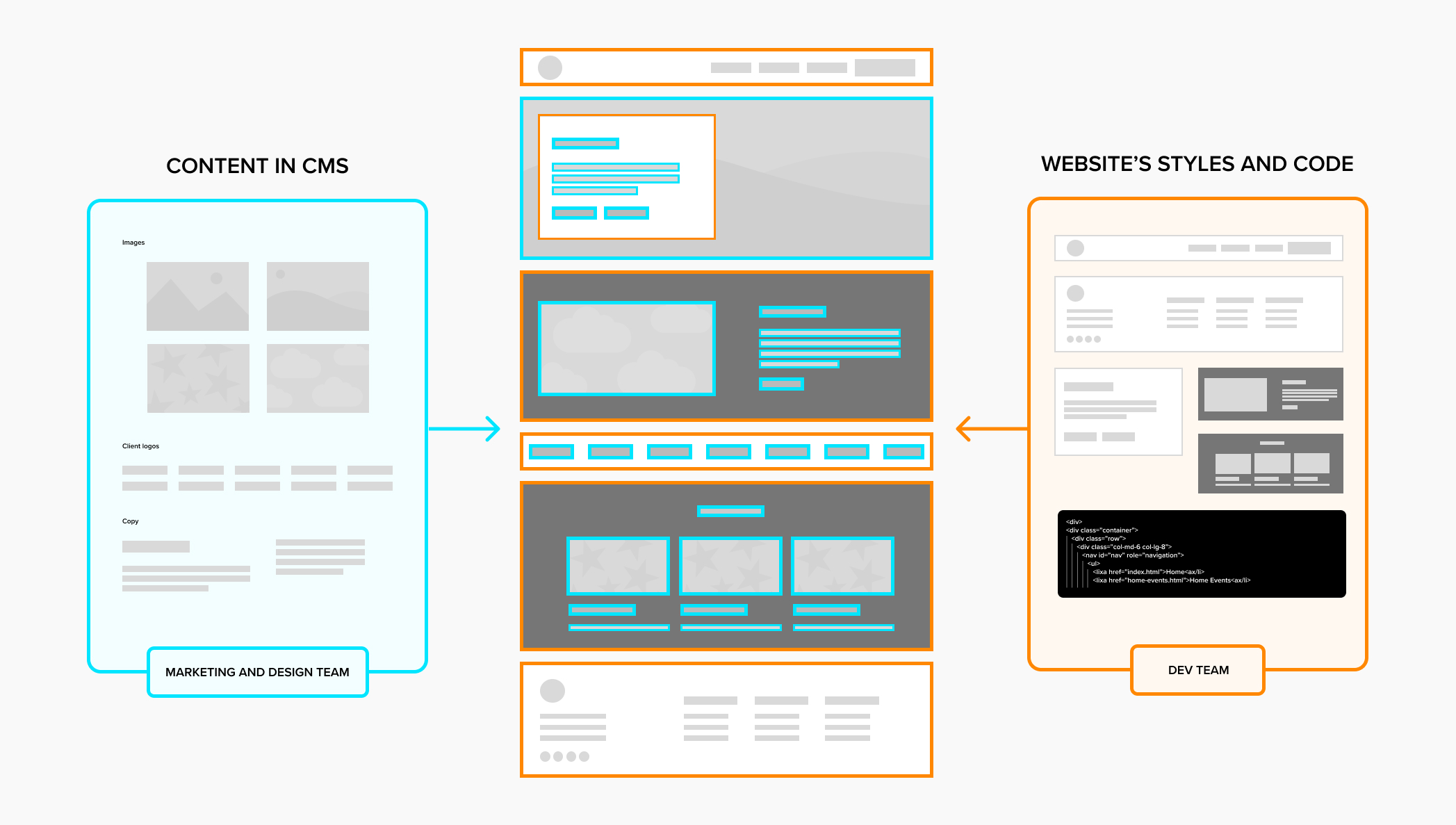
A CMS (Content Management System) is the tool your team uses to create, edit, and publish website content: pages, blog posts, landing pages, case studies, resources, you name it.
If your website is your marketing engine, your CMS is the system that determines whether that engine accelerates or stalls. The goal is for your marketing team to be on cruise control because they have the tools to add, remove, and edit content across your website in a way that keeps your brand intact, supports SEO/AEO, and keeps the marketing journey going.
Why the CMS decision is so important for a B2B website
A B2B website isn’t a digital brochure (because it’s not 2012). It’s doing a bunch of heavy lifting all at once:
- Building credibility fast (because buyers are skeptical and busy)
- Supporting long buying journeys with content
- Converting high-intent traffic through landing pages
- Helping sales teams with proof (case studies, capabilities, clarity)
- Driving SEO growth over time
- Evolving constantly as your strategy changes
This is why we talk about websites as long-term business assets, not one-off projects. And it’s also why using the wrong CMS isn’t just an inconvenience—it can mean lower performing campaigns, weaker SEO execution, more dev bottlenecks, higher long-term cost, and eventually… the “we need a new website” death spiral.
Relaunching your website? Avoid these costly redesign mistakes
The first decision for a B2B CMS is about type
Based on the size of your organization and the composition of your team, the first fork in the road is going to be what general approach to your website you will take.
Website builders on a SaaS model for small businesses or freelancers
Examples: Wix, Squarespace, Weebly (and similar “drag-and-drop” builders)
They’re usually cheap but also easy to outgrow. These are great when you need something simple, you need it fast, and you don’t plan to do much ongoing marketing on the site. For example, a freelance consultant, a personal trainer or a someone who has a retail side-hustle may benefit from these CMS options.
Where they fall short for B2B is:
- They have limited control over SEO structure and technical SEO nuances
- They’re harder to scale content architecture over time
- There’s only so much customization you can do (with design, functionality, integrations)
These options are great for getting a website up quickly but not-so-great if you’re doing serious content marketing, building conversion paths, and trying to differentiate your brand in a competitive market with long sales cycles.
Headless or decoupled CMS for technical teams
Examples: Contentful, Sanity, Strapi
A rising star in the CMS conversation, the headless CMS stores content in a “content repository” and serves it on the site with an API. The website front-end is built separately. So your content is stored in one place and your code is somewhere else. In plain language: it’s CMS + custom website code + more systems to manage.
Headless can be the right choice when:
- You’re publishing content to multiple channels (web + app + kiosk + etc.)
- You have strong technical/engineering resources in-house
- You want maximum performance and control
Where it falls short for many B2B marketing teams:
- Marketing becomes dependent on developers for simple updates and it slows down their initiatives
- The total cost of ownership is usually higher than people expect as API calls increase
- You add operational complexity that requires ongoing time and attention
Most small to midsized B2B organizations don’t have the internal development resources to realize the promised benefits of a headless architecture.
Enterprise suites for the biggies
Examples: Adobe Experience Manager (AEM), Sitecore
These exist for a reason and can come in decoupled or headless options as well. Some organizations truly need complex governance with approvals and workflows, global rollouts with massive regionalization or personalization programs, and more. But for many B2B companies that aren’t global or in highly regulated industries, enterprise CMS suites become expensive to implement and maintain, slow to update, and expensive overkill relative to their actual needs.
The traditional CMS choices: most recommended for B2B by Stryve
Examples: HubSpot, Webflow, WordPress
Calling these “traditional” almost undersells them. These platforms have evolved significantly over the last decade and sit in a sweet spot for many B2B organizations: flexible enough to scale, powerful enough for serious marketing, and accessible enough for non-technical teams to own.
At a high level, traditional CMS platforms combine content management, templating, and front-end delivery in one system. You’re not stitching together multiple tools just to publish a page, which matters when marketing teams are the ones who own the website experience and are continuously asked to deliver yesterday with fewer resources.
| Platform / Examples | Best For | Typical Tradeoff |
|---|---|---|
| SaaS website builders (Wix, Squarespace, Weebly) | Small teams that need a simple site fast with minimal ongoing marketing | Speed and simplicity over long-term flexibility |
| Headless / decoupled CMS (Contentful, Sanity, Strapi) | Organizations with strong engineering teams and multi-channel delivery needs | Control and performance at the cost of simplicity |
| Enterprise CMS suites (Adobe Experience Manager, Sitecore) | Large or global organizations with complex governance and compliance needs | Governance and power over agility and cost |
| Traditional CMS (HubSpot, Webflow, WordPress) | B2B teams focused on content, demand generation, and growth | Balanced flexibility without over-engineering |
The right traditional CMS for your mid-sized B2B organization is about scalability
If the most important priority for your website is to empower your marketing team, you can see why a traditional CMS is still the most common approach to this day. Is it as flashy of a approach? Maybe not, but a strong track record is important for a CMS.
When clients ask us about which CMS they should go with, they’re usually asking us about these 3 main options. All of them can support a professional-looking website with the right design and development talent leading the work. All of them enable marketing teams to make the usual updates after a new site is built. The nuanced difference we’ve seen over the years comes down to how easy it is to work with your new website after it’s been launched.
HubSpot CMS
The CMS in HubSpot is one product within their entire marketing, sales, and service stack. It can be awesome if your whole world already lives in that ecosystem. You might love the tight integration between your CRM + forms, the streamlined workflows, and fewer moving parts. Where issues usually crop up is because:
- You’re completely locked into that platform, whether or not it can grow with your website needs
- The design and development flexibility can be limited depending on your needs
- You’re at the mercy of what they choose to charge, which can be a lot and can creep up as you scale
- They’re building more than a CMS, so new features in that area may not be their priority
Plus there are ways to make it easy to connect your website’s forms to your CRM, automations, and other integrations without being stuck with one platform. We’ve seen tons of B2B companies that still use HubSpot’s CRM, marketing automation, and sales tools with their non-HubSpot website (including us!)
Webflow
Webflow is a design‑forward CMS that gives teams strong visual control and relatively clean front‑end output. Teams with in‑house UX or design resources often appreciate how much control Webflow offers without needing to write a lot of custom code. Marketing teams can publish and update pages independently, like you’d expect of a CMS.
We’ve seen B2B teams run into challenges with Webflow when their sites become more content-heavy and they want more functionality and integrations. As you scale, you may find that:
- Managing large, multi-layered content architectures can become cumbersome
- SEO and content workflows require more manual coordination than expected
- Integrating deeply with complex B2B tech stacks often involves custom work or third-party tools
- What you’re paying for Webflow increases significantly (including charging per user account or “seat”)
When marketing teams are interested in Webflow, it’s usually because they love all the options in the editing side-bar for customizing their pages. I also love that, but it’s also not the only platform that has these code-less design options.
WordPress
WordPress is still the most widely used CMS in the world. At its core, WordPress is a flexible, open-source platform. Unlike proprietary platforms, WordPress doesn’t prescribe how you build or operate your website. With the right strategy, design system, and development standards in place, WordPress can support everything from simple marketing sites to large, multi‑section content ecosystems with ease. WordPress is aligned with how most B2B marketing teams operate: constant iteration, content expansion, campaign velocity and easier collaboration with teams like sales.
The main critique that WordPress faces is around its security and governance. Those are important worries, but WordPress can address them. There are specific enterprise-grade platforms (eg. WordPress VIP), hosts (Pantheon, WP Engine, and Kinsta), and agencies that focus on that section of the market. They’ll configure your website and CMS according to your needs.
We’ve also heard the horror stories of a WordPress site that follows absolutely no guardrails. This is less about the platform itself and more about how it’s managed over time. Without clear governance, marketing teams can gradually introduce too many plugins, one-off templates, or workarounds that create unnecessary complexity. This is true of any web platform as well, but we also recognize that the huge ecosystem of WordPress plugins, templates, and DIY guides out there makes it extra tempting.
And this is the key for mid-sized B2B companies: WordPress hits the balance in the middle that you probably want. There’s marketing ownership without platform lock‑in, scalability without unnecessary complexity, and the ability to evolve the site without needing to start completely from scratch every few years.
| Platform | Works Best When | Scalability Reality |
|---|---|---|
| HubSpot CMS | Your marketing, sales, and CRM operations already live entirely in HubSpot | Easy early wins, but long-term flexibility, pricing control, and platform lock‑in can limit how your website evolves |
| Webflow | Design quality is a top priority and you have strong UX or design resources in-house | Scales visually, but content-heavy sites, SEO workflows, and integrations can become harder to manage over time |
| WordPress | You need a flexible platform that can grow with your content, integrations, and marketing maturity | Scales well with the right guardrails in place, balancing marketing ownership with long-term adaptability |
Making the business case for WordPress for your B2B website
At this point I’m hoping you can see how WordPress can fit the balance that mid-size B2B companies are looking for. So we’re going to bring it all together so you can sell leadership on the decision to go with WordPress as your CMS. It ultimately comes down to cost control and operational flexibility, which add up to long-term ROI.
Better cost predictability and lower total cost of ownership
The most common mistake teams make when evaluating CMS options is focusing on build cost instead of total cost of ownership. WordPress is open-source and not owned by a single vendor. That means:
- No mandatory licensing fees for the CMS itself
- No paying per user/seat
- No surprise price increases tied to traffic, API usage, or feature tiers
- No forced upgrades because a vendor changed their roadmap
There are still real costs involved: hosting, development, ongoing maintenance, and additional plugins. But these costs are transparent, highly competitive and thus usually lower, and largely within your control. Other open-source platforms like Drupal share some of these benefits, but WordPress wins specifically because of how widespread and popular it is. You’re able to compare WordPress hosting options, be very choosy in your developers, and shop through multiple plugins that do that one little thing you need.
How much does a new B2B website cost? Breaking down what goes into a website project
Reduced long-term risk through flexibility
Some CMS platforms feel great until you need to do a significant redesign, integrate new tools, or want to change up developers. WordPress powers 43% of the entire internet and has a 61% share of the CMS market. It’s actually more popular to not use a CMS than to choose one other than WordPress.
This means over the long-term you’ll have an easier time finding:
- Marketing team members that have used WordPress before
- Agencies and development partners that have deep WordPress expertise
- A WordPress plugin that adds that niche functionality or integration you need (for a much lower cost than developing it yourself)
This flexibility becomes especially valuable during moments of change, which seem to be more of the rule than the exception these days.
High-velocity marketing operations
For most B2B orgs, content marketing is part of the growth strategy. And WordPress is fundamentally built for content. It makes it easier for marketing teams to:
- Publish consistently without developer intervention
- Build and evolve content architectures over time
- Create landing pages and campaign pages without waiting on developers
All of the CMS options can claim this, so the nuance here is in how you do it within WordPress. With the introduction of the Gutenberg block editor in 2018, WordPress put a lot more power in the average users hands. The experience is now similar to what you’d see in a newer, proprietary CMS like Webflow.
Whether you end up going the WordPress route or not, make sure your marketing team is well-aligned on what “flexibility” means for moving fast. There are intentional choices to make around how much flexibility and control to give content editors, graphic designers, and marketing managers. WordPress supports a wide range of models, from tightly governed to highly flexible, to make sure the different controls are in the right hands.
So, now you know why WordPress is a great option for most B2B marketing teams
By now, the pattern should be clear. Every CMS can publish pages. Every CMS can look good. Every CMS has a sales deck that promises “flexibility” and “scalability.” The real difference shows up after launch, when marketing needs to move, priorities shift, and the website becomes a living system instead of a finished project. For most mid-sized B2B organizations, we believe WordPress offers the best balance overall. That’s not because WordPress is perfect. It’s because it it can be tailored to align with how your B2B marketing actually works.
And if you’re still weighing options, that’s a good thing. A CMS decision should be thoughtful. Just make sure you’re evaluating it based on how your team needs to operate, not just what looks impressive in a demo.




 Download